How to make AI product video ads with OfoxAI
Turn product photos into AI video ads with OfoxAI. Use a 12-second coffee maker demo, reference images, prompts, continuity checks and feed-ad preparation.
 Ofox
Ofox 
To turn product photos into an AI video ad, start with a visible customer problem, prepare consistent reference images, and describe how discovering the product changes the character’s actions. In OfoxAI, upload those images in the video workspace, add your scene instructions, choose a model and settings, then review the result before adding your brand and call to action.
This tutorial follows a portable coffee maker concept. A man carries an absurdly large espresso machine on his back just to drink coffee outside. He spots a small orange coffee maker, picks it up, and abandons the burden. The joke gets attention; the contrast gives the product a reason to be in the story.
Watch the 12-second product video ad
Download the video. Try watching it muted first: can you still understand why the character changes his mind?
This is an actual OfoxAI video output, generated with Wan 3.0 at 12 seconds, 9:16 and 720p, with audio enabled. The two reference images were created earlier with a separate AI image tool. The coffee maker is a fictional concept, not a client product. This is a production walkthrough, with no campaign performance data or verified product claims.
Product showcase, feed ad, or organic social video?
These formats can share footage, but they have different jobs. Choose the job before writing a prompt.
| Use | What the viewer needs | What to prioritize |
|---|---|---|
| Ecommerce product-page video | A clear look at the item, its parts and operation | Accurate detail; real footage for functional demonstrations |
| In-feed video ad | A reason to stop and consider the product | An opening hook, a product-led change, and a next step |
| Organic social product video | A story worth watching or sharing | Context for the account’s audience and suitable post copy |
We are making a story-led feed ad concept. The footage could also become an organic post, but publishing it on social media would not validate its advertising performance. If you only need a product-page rotation, focus on accurate views of the item instead of adding a character story.
The method is not exclusive to Instagram Reels. The creative idea can carry across Facebook and Instagram feeds; the exported file still needs to suit the selected placement. We chose 9:16 to show the man, the huge machine above his shoulders, and the small product in his hand. It is not a universal Meta ad specification.
Make the benefit visible before choosing camera moves
“Portable, premium, cinematic” does not explain what should happen. We exaggerated the opposite of portability: carrying a café-sized machine down the street while trying to sip from a tiny cup. That opening asks a visual question: why should getting coffee be so difficult?
The small machine answers it. The man needs to notice it, pick it up, recognize an easier option, and unload the big machine. The product causes his decision. Without those connecting actions, it becomes a product shot attached to an unrelated joke.
An earlier edit joined two short clips: the burden and the small machine. It established a contrast but left out the decision. The revision adds discovery and handling before relief.
| Planned timing | Action | Purpose |
|---|---|---|
| 0–3 seconds | Struggle under the giant machine while drinking | Establish the problem immediately |
| 3–5 seconds | Notice the small coffee maker on a plinth | Bring the product into the character’s attention |
| 5–7 seconds | Put down the cup and pick up the product | Express portability through an action |
| 7–10 seconds | Set the product down and unload the machine | Show the consequence of his choice |
| 10–12 seconds | Drink comfortably; finish on the product | Leave the viewer with the item being advertised |
These are prompt timings, not frame-accurate descriptions of the output.
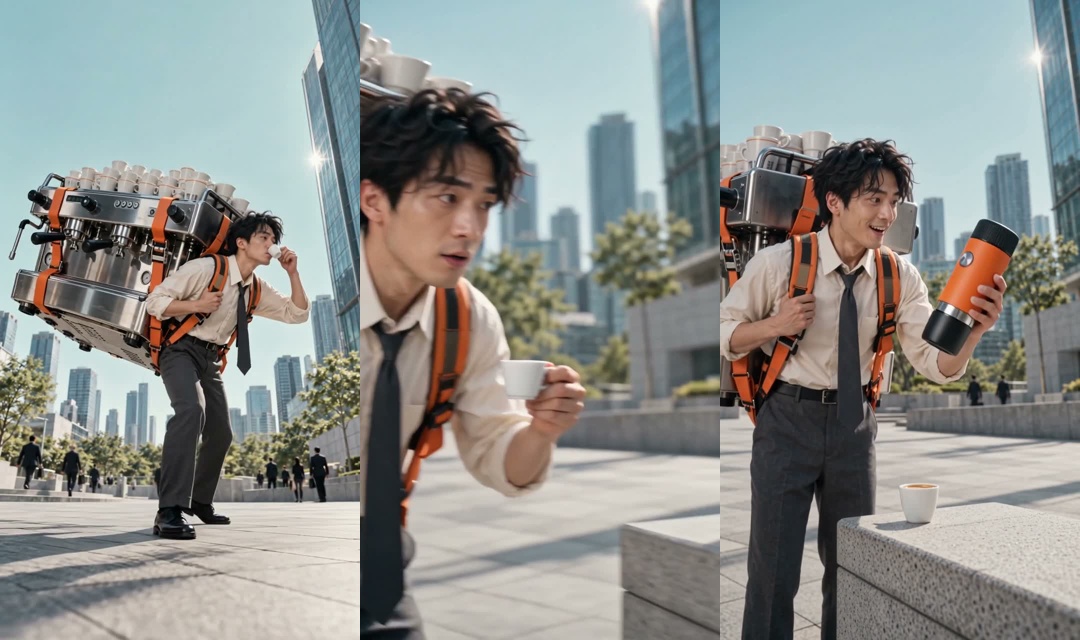
Frames from the generated video: carrying the burden, discovering the product, and picking it up. These are extracted frames, not additional generated illustrations.
Prepare references that agree with each other
Use one reference to establish the character and opening situation, and another to define the small product. Match the person, clothing, location and light so the model has fewer gaps to invent.
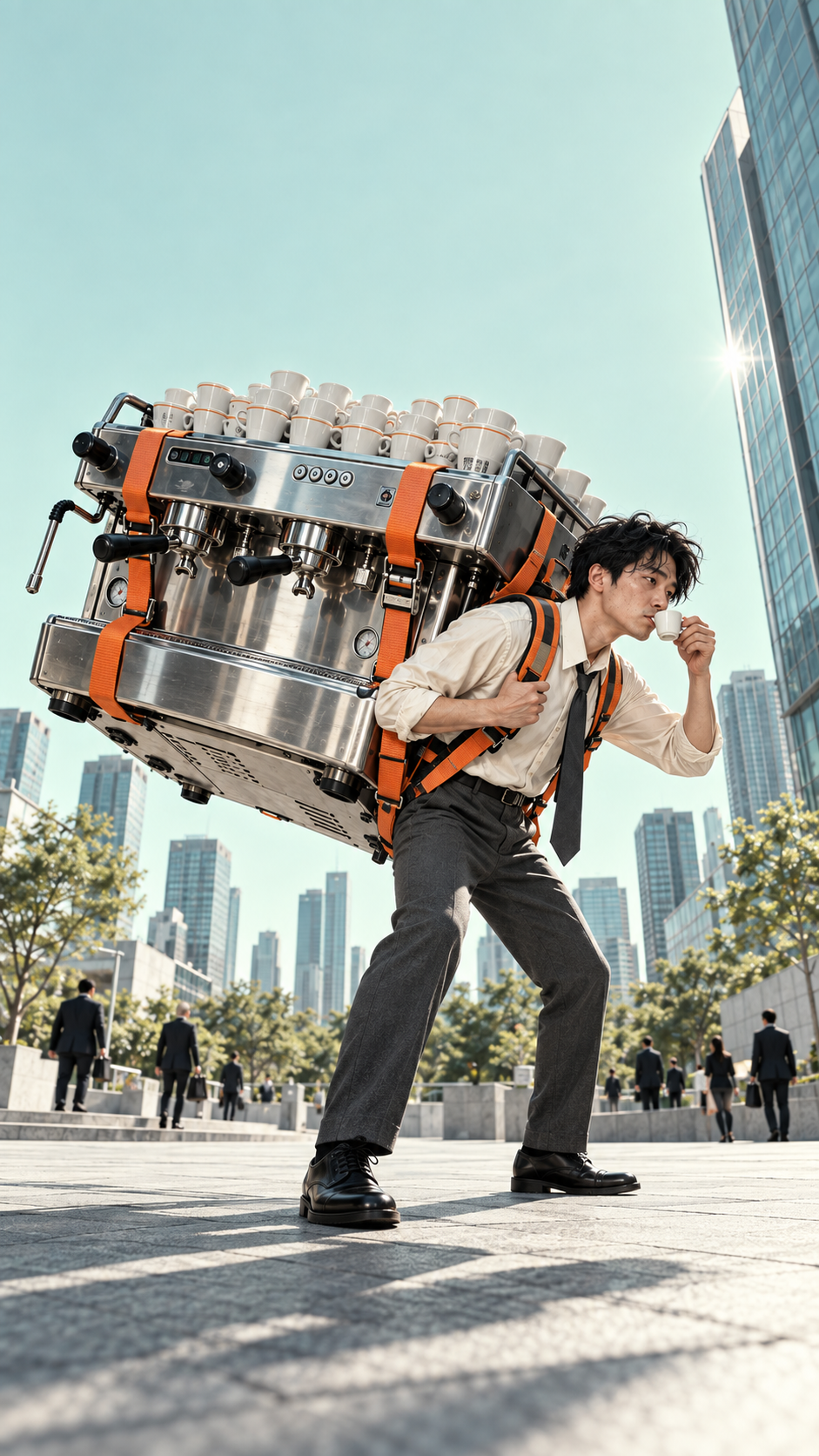
Reference 1 fixes the white shirt, black tie, orange straps and oversized silver machine. Download the reference.
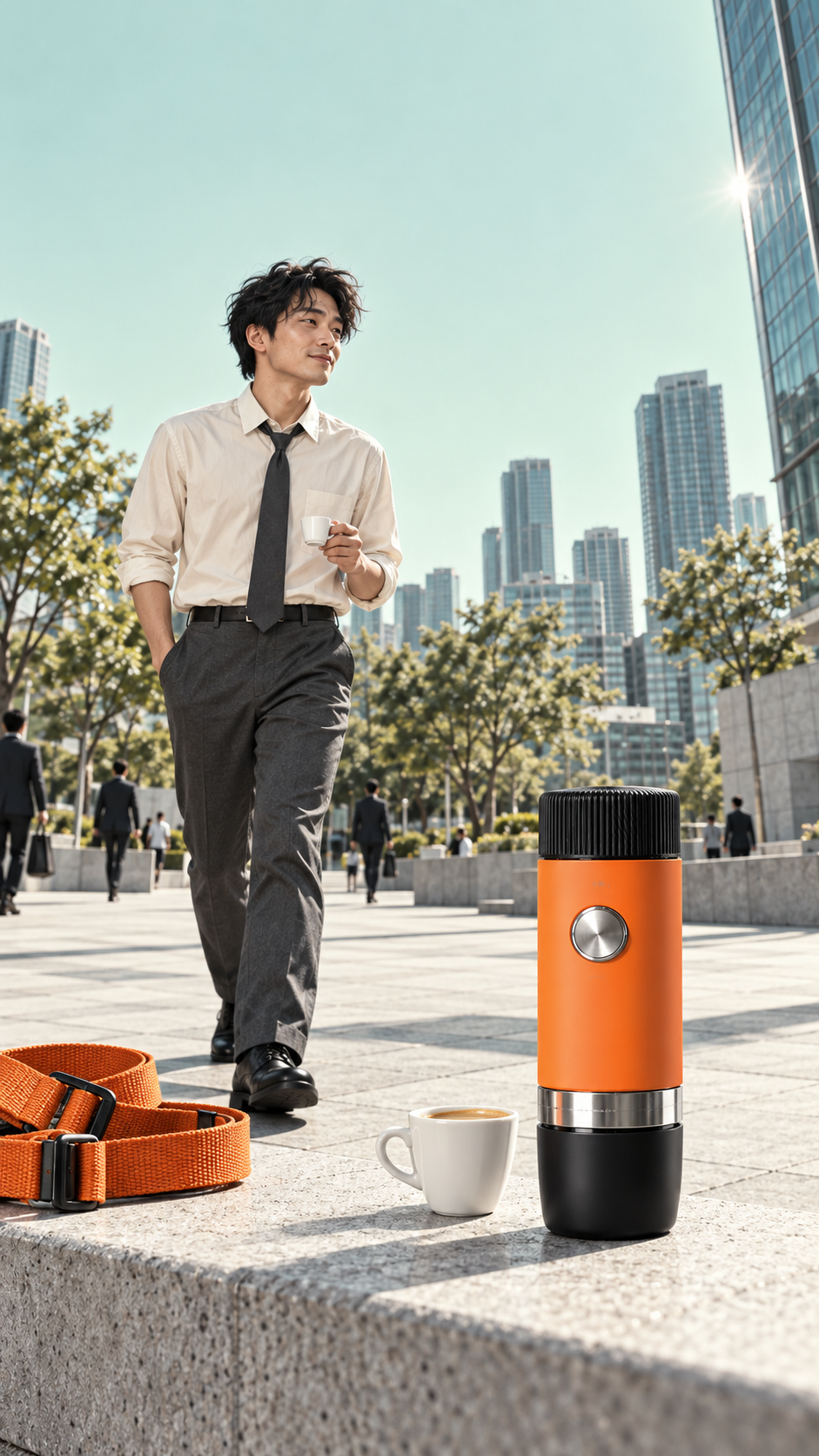
Reference 2 defines the orange body, black lid, silver circular button and lower cup. Download the reference.
For a real ecommerce item, replace these concept images with photographs you have permission to use. Check body proportions, controls, ports and accessories before generating motion. An image alone cannot establish brewing pressure, battery life, leak resistance or speed. Support those claims with real evidence.
If the background makes the item hard to read, use the product photo background workflow first. Check that the preparation step has not changed the item itself.
Register, sign in, and open OfoxAI’s video workspace
- Open OfoxAI sign-up. Use an available Google or GitHub option, or complete the name, email, password and confirmation fields. Follow the remaining instructions on the page.
- Already registered? Use the sign-in page with your existing login method.
- Choose Video in the sidebar, or open the OfoxAI video workspace. This walkthrough uses the web interface; you do not need to write an API request.
- Select Image as the input method, add the two local reference files, check the thumbnails, and enter the prompt.
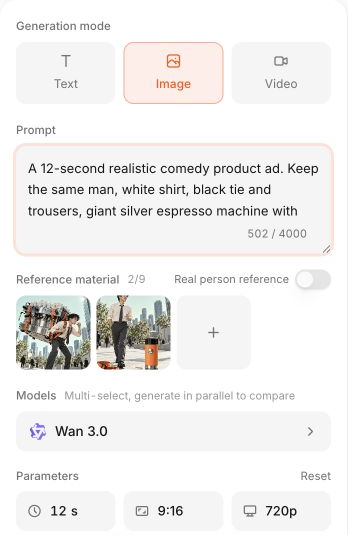
Actual English OfoxAI interface, filled in again to illustrate the setup. The screenshot uses a shortened English explanation; the completed video used the full Chinese prompt linked below. No new generation was submitted for this screenshot. Account details are cropped out, and the image is shown without enlargement.
Select Wan 3.0, set the duration to 12 seconds, choose 9:16 and 720p, and enable audio. These are the settings used for this example, not a claim that they are optimal for every product. Available models and controls may change. Review the estimate for your request before selecting Generate.
Open the result in History, watch the whole clip, and download it once it is usable. This example was not a first-attempt success: a Seedance 2.5 attempt at the story failed, and the Wan 3.0 job initially showed a timeout before a playable result appeared in History. Check the same job’s status before repeatedly submitting another request.
Write transitions, not just a list of shots
A useful prompt explains what must happen before the next action. A hand holding a cup cannot also pick up a coffee maker. The character first puts down the cup. Unloading the big machine needs both hands, so he sets down the small one before loosening the straps.
The following is an English adaptation of the instructions. The video above was generated from the complete original Chinese prompt; the English adaptation has not been separately tested.
Create a 12-second realistic comedy product ad.

Reference 1 defines the same young Asian man in a white shirt,
black tie and black trousers, carrying a huge silver espresso machine
with orange straps. Reference 2 defines the portable coffee maker:
orange cylindrical body, black lid, silver round button, silver lower
ring and black bottom cup. It is roughly the height of a travel flask
and can be held in one hand. Keep the two machines separate.

Use the same sunny city plaza. The man moves left to right.
Maintain the character, lighting, white coffee cup and props.

0–3s: A medium-wide tracking shot. He stoops under the enormous
machine, takes two difficult steps, and struggles to sip from the
small white cup in his right hand. He looks exhausted.
3–5s: He notices an orange portable coffee maker on a stone plinth
ahead to his right. He stops. Cut along his eyeline to the product,
then back to his surprised face.
5–7s: He approaches, puts the white cup down, and picks up the
small machine with his right hand. He weighs it lightly, looks back
at the huge machine, and smiles in realization. Preserve its shape.
7–10s: He places the small machine back on the plinth, loosens both
orange shoulder straps, and swings the big machine behind him.
It lands heavily on empty ground and stays there. No explosion,
flying debris, disappearance or injury. He straightens in relief.
10–12s: He picks up the portable maker with his left hand and the
cup with his right, drinks comfortably, and walks right. Finish
closer on the orange product, with the big machine left behind.

Discovery must cause the decision. Show noticing, picking up and
unloading. Use footsteps, breathing, cup sounds and a low landing
thud. No dialogue, captions, logos or music. Match eyelines and actions.
For another product, keep the causal structure and rewrite the physical actions. A backpack might demonstrate easier packing; it does not need the coffee-machine gag. Changing only the product name usually leaves an implausible story.
Review the generated clip before calling it an ad
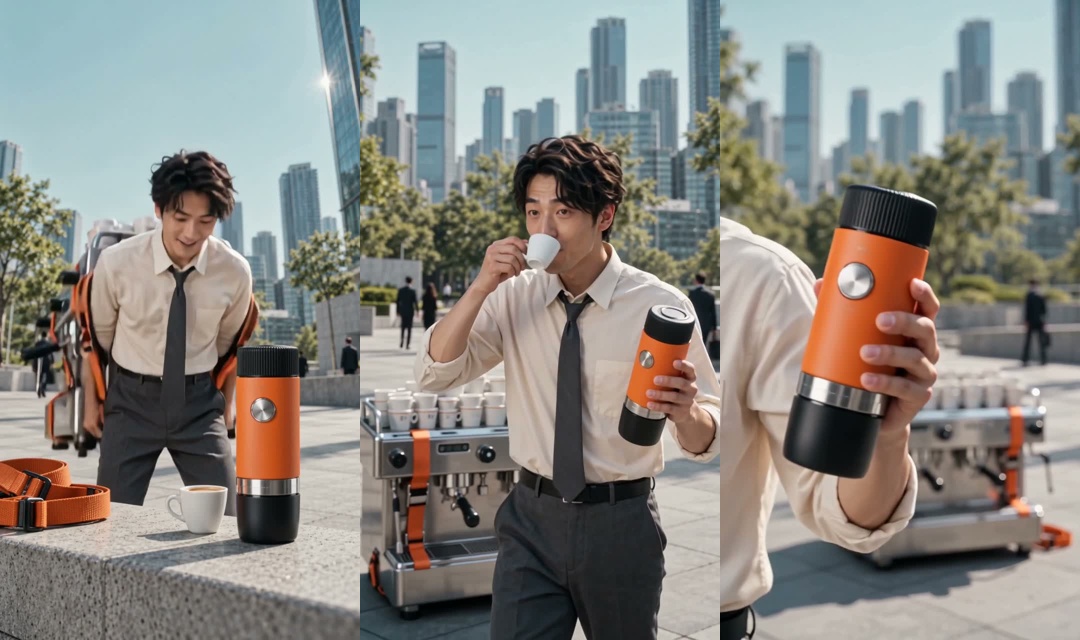
Later frames show unloading, relief and the product close-up. The generated action is closer to unloading and dropping the heavy machine than the dramatic backward throw requested in the prompt. That difference remains visible in the published demo.
Start with the story: can a muted viewer explain what the man discovered and why he changed his behavior? Then compare frames with the reference. Inspect the product’s outline, button position, cup, fingers and grip. Check whether the white cup and large machine remain consistent between shots.
| Problem | Focus the next revision on |
|---|---|
| The product appears without a clear connection | Add looking, stopping and picking up; remove unrelated transitions |
| The maker changes size or its button drifts | State scale relative to the hand, reduce rotations, improve the reference |
| Cup, product and straps compete for the same hands | Sequence putting down, picking up and unloading |
| The large machine vanishes | Require a physical landing and its presence in later background shots |
| Attractive shots communicate no buying reason | Make the product visibly change the character’s situation |
This 720p demo demonstrates the creative idea and production method. It does not yet include a brand, purchase destination or verified brewing demonstration. It is not evidence of conversion performance.
Finish versions for the placements you will use
Add editable branding and copy in a video editor. This makes spelling, localization and positioning easier to control than asking the generation model to render small text throughout the clip.
One copy direction to test is “Coffee without the baggage,” followed by a clear product end frame and “Explore the portable coffee maker.” These are proposed lines, not tested winners. For a real item, the name, claim and landing page must agree.
Preview each placement separately. A vertical composition preserves the relationship between the character and the two machines. If you prepare a 4:5 or square version, check that the crop still contains the essential props. Recompose a shot when necessary; stretching it or cutting out the discovery can destroy the idea. Use the placement preview in your advertising tool and consult the relevant Meta Ads Guide entry when preparing Meta campaigns.
For a first comparison, change only the opening while keeping the product, duration and destination consistent. Judge the alternatives with actual campaign data; no such test was run for this tutorial. Save the references, prompt, settings and final file with the pre-publication checklist so the next revision has a clear starting point.
Frequently Asked Questions
- Can one product photo become an ecommerce video?
- You can start with one photo for a simple appearance-focused clip. This example uses character and product references because it contains a sequence of actions. More images do not automatically improve the result; their information must agree.
- Does an AI feed ad have to be an Instagram Reel?
- No. Define the buying reason and audience first, then prepare the file for the Facebook, Instagram or other placement you select. The 9:16 format used here is a creative choice, not a universal feed-ad requirement.
- Can generated footage prove how a real product works?
- No. Check appearance against the actual item and support functional claims with real evidence. This fictional coffee maker is a creative demonstration, not a product test.
- How do you improve continuity in AI product videos?
- Keep the character, setting, product and movement direction consistent. Describe the order of noticing, picking up and putting down objects. Inspect the resulting transitions. If the actions still fail, simplify the scene or regenerate sections instead of adding more style adjectives.